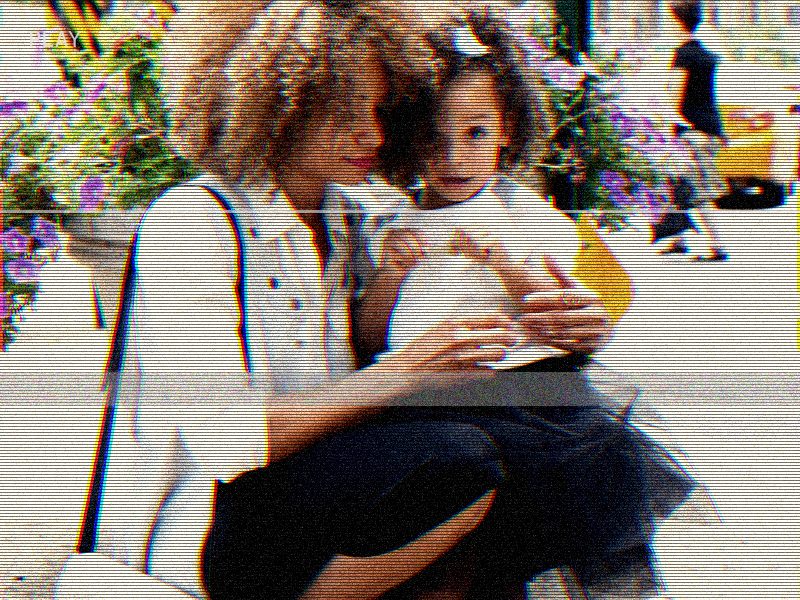
The same photo before and after the browser export: tape-style contrast and color treatment, fine scanlines, scattered noise, a traveling tracking band and camcorder stamps. The original stays untouched on the left.
Original photoAfter the VHS photo effect
How to create a VHS photo effect
Start with a JPG or PNG, choose a camcorder or damaged-tape preset, then tune noise, scanlines, tracking lines and color bleed. The strongest VHS photo effects usually combine visible scanlines with slight color separation and a small amount of random tape noise.
For portraits, keep tracking low so faces stay readable. For album covers, posters and thumbnails, push color bleed and scanlines higher so the analog look is clear even at small sizes.
VHS effect photo ideas
Portrait: medium scanlines, low tracking, warm color bleed.
Album cover: high contrast, high noise and strong timestamp-style overlay.
Thumbnail: bright color bleed, readable subject and clear VHS texture.
Glitch frame: heavy tracking, damaged tape preset and darker contrast.
Best photos for VHS effects
VHS effects work best on images with a clear subject, strong light direction and enough dark space for scanlines and noise to show. Very flat screenshots can still work, but portraits, city night shots, music artwork and product images usually show the retro tape texture more clearly.
VHS Photo Effect FAQ
How does the VHS photo effect work?
It processes your photo in the browser with tape-style contrast and color treatment, fine scanlines, scattered tape noise and camcorder-style stamps. Preview and export both run locally, so there is no render queue and the photo never leaves your device.
Is the VHS photo effect really free?
Yes. The browser editor adds no watermark and has no export limit. Photos export as PNG up to 1600 pixels wide.
What image formats are supported?
JPG and PNG are the safest formats for preview and export. Very large images may preview more slowly on older phones or low-memory browsers.
What's the best photo type for the VHS effect?
Portraits, city night shots and scenes with a clear subject and strong light direction work best. Dark areas reveal tape noise, while saturated edges show the color treatment most clearly.
Does it work on mobile?
Yes. The editor runs in iOS Safari, Android Chrome and any modern mobile browser. Pick a photo, tap upload, compare the before and after sides and export the result.